
What an illustrated parts catalog is
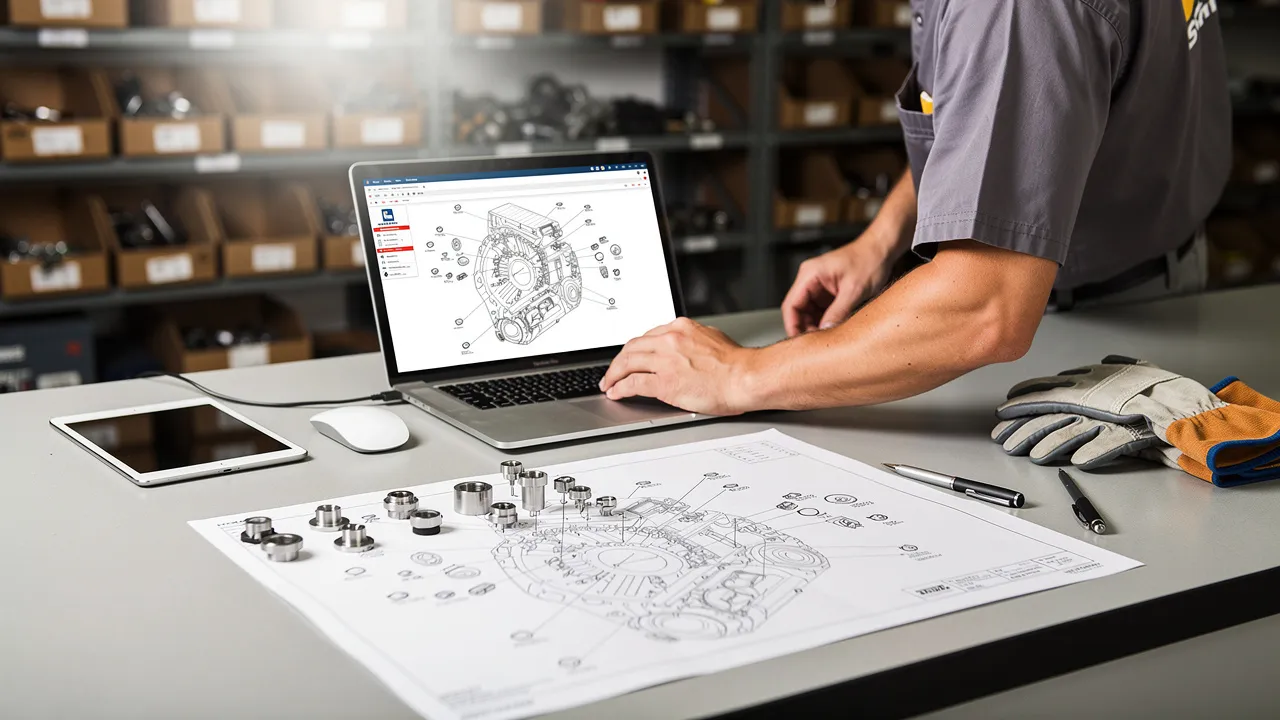
An illustrated parts catalog is a structured parts list paired with visual representations of equipment assemblies. Instead of asking you to identify a replacement part from a bare part number or a long text description, the catalog places components in the context of the machine, vehicle, or assembly where they belong.
You may also see similar tools called electronic parts catalogs, or EPCs, and interactive parts catalogs, or IPCs. The names can vary, but the basic purpose is similar: connect an equipment view to organized part information so you can move from a visible component to a possible part record. The catalog helps with identification; it does not automatically settle every question about fit, configuration, revision, or installation.
For a parts distributor or dealer, the useful mental model is a visual map. You begin with the equipment context, narrow the view to an assembly, match an item reference to the component, and then inspect the associated part information. Some dealer-facing catalogs also support searches by part number, keyword, model, or variant, so you can start with the information already available to you.
That makes the catalog more than a picture library. It is an identification path that can support a parts lookup and, in some implementations, lead into an ordering workflow. The exact path depends on the catalog's data, search functions, and connection to other systems.
The visual map from assembly to part record
The visual map from an assembly to a part record has several connected layers. The equipment model identifies the larger product context. An assembly groups related components, such as a system or subassembly. An illustration shows those components in relation to one another, while item references point from visible components to entries in a structured parts list.
The parts list then supplies the record associated with an item reference. Depending on the catalog, that record may include a part number and related information. The illustration gives you spatial context; the reference gives you a bridge; the part record gives you the text or data needed to continue the lookup.
A catalog can therefore answer two different questions in sequence:
- Where is the component? The assembly illustration helps you locate it among related components.
- What record corresponds to it? The item reference connects the selected component to a parts-list entry.
This separation matters because a part's appearance alone may not distinguish it from nearby or similar components. The assembly context narrows the possibilities before you examine the record.
An assembly illustration should be read as a relationship map, not as a scale drawing. A callout or item reference identifies a position in the illustration and corresponds to a position in the parts list. The corresponding entry may then identify the part number or other information used for the next step.
Some catalogs also associate a part with the equipment models or variants where it applies. That relationship adds a second check: the component may look right in the drawing, but the selected record still needs to match the equipment context you are working with. Treat the illustration and the part record as two halves of the same lookup rather than choosing between them.
How interactive catalogs connect illustrations to part information
Interactive catalogs connect illustrations to part information through selectable areas, often called hotspots. A hotspot links a component shown in the illustration to its corresponding parts entry. When the connection is available, selecting the visual component can take you to a part number and related information.
The interaction changes the order of the lookup. Rather than opening a general parts list and scanning every entry, you can begin with the assembly view, select the component, and follow the linked record. This is especially useful when you know what the component looks like or where it sits but do not know its name or number.
The visual link still needs interpretation. A hotspot identifies the entry connected to that illustration; it does not by itself prove that the equipment model, variant, or revision on your work order matches the selected record.
Interactive behavior varies by implementation. Some catalogs may offer only linked diagrams and part entries, while others may add search, applicability information, alternate or superseded part indicators, and an order path. Use the functions that are actually present in the catalog you are using.
For a dealer or distributor, that distinction prevents an avoidable assumption: an illustration may be available without every surrounding ordering feature. The reliable question is not whether a catalog is called interactive. The reliable question is whether its visual links lead to the part information and equipment context you need for the specific lookup.
A practical process for identifying a replacement part
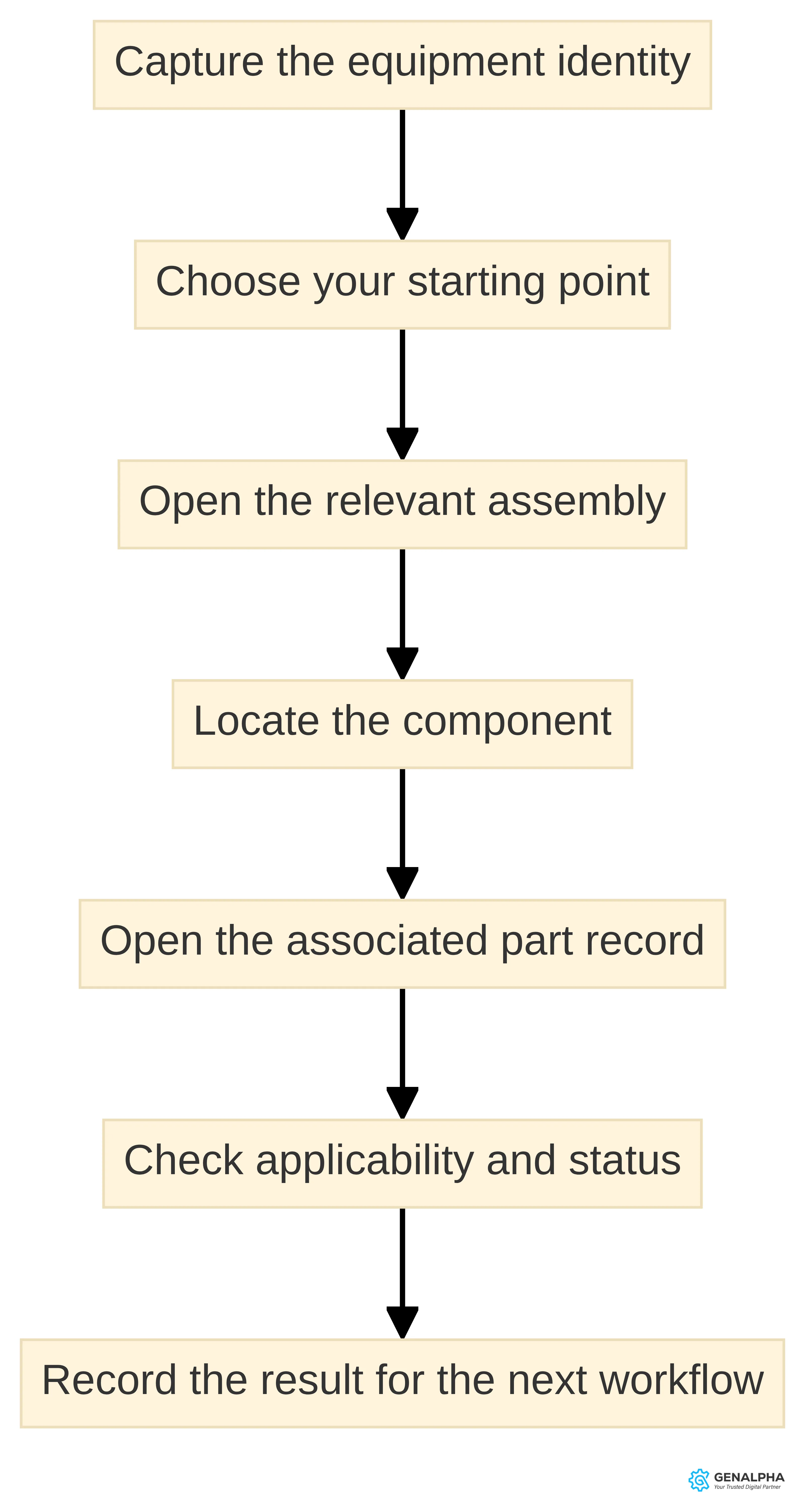
A practical replacement-part lookup starts with the information you already have and ends with a checked part record. You can use the following sequence for a dealer inquiry, a distributor request, or an internal parts search:
- Capture the equipment identity. Record the model and any available variant, configuration, serial information, or other identifier that distinguishes the equipment involved. Use the information supplied with the request rather than relying on a visual resemblance alone.
- Choose your starting point. Search by model, variant, keyword, or part number when the catalog supports those methods. If you have no part number, begin with the equipment model or the name of the assembly involved.
- Open the relevant assembly. Move from the equipment level to the diagram that contains the component. An assembly view gives you context that a text-only result may not provide.
- Locate the component. Compare the component's position and surrounding parts with the equipment or request in front of you. Select its item reference or hotspot when the catalog provides one.
- Open the associated part record. Read the linked part number and related information. Do not stop at the first visually similar item.
- Check applicability and status. Confirm the model or variant, and look for any alternate or superseded part indication where the catalog provides it.
- Record the result for the next workflow. Capture the part number and the context used to identify it before you move to quotation, availability, or ordering.
The sequence separates identification from ordering. Some dealer-facing catalogs connect the lookup to online ordering, but the ordering step is a feature of that particular implementation rather than a defining property of every illustrated catalog. When the catalog does connect to an order path, carry the checked equipment context into that step instead of treating the first search result as final.
A short record of your lookup can include the equipment identifier, assembly name, item reference, selected part number, and any applicability or supersession note. That record gives you a clear basis for a later question if the part needs confirmation.
Use search tools, then confirm the visual match
Search tools help you reach the right area of a catalog, but the visual match helps you judge whether the result belongs to the requested assembly. Some electronic parts catalogs let dealers search by part number, keyword, model, or variant. That flexibility is useful when a customer gives you incomplete information or starts with a term rather than a number.
Use the search result as a route into the catalog, not as the entire identification decision. After opening the result, compare:
- the equipment model or variant;
- the assembly or system name;
- the item's position relative to nearby components; and
- the part information connected to the item reference.
A text match can bring you to a plausible record. The illustration and assembly context help you decide whether the record is the one associated with the component you need.
A dealer-facing catalog may include diagrams intended to help you check a part before ordering. It may also show which parts apply to particular models and variants. Use those fields together when they are available, because a matching keyword does not establish applicability by itself.
If the diagram, model information, and part record point in different directions, pause the lookup. Keep the result as a candidate and obtain the missing equipment or catalog information before treating it as ready for an order.
Check model, revision, applicability, and part number before ordering
Model, revision, applicability, and part-number checks determine whether an identified result is ready for confirmation or ordering. A useful check does not require you to distrust the illustration. It requires you to match the catalog record to the equipment context and to account for changes in the parts information.
Use this four-part check:
- Model: Does the catalog path identify the same equipment model as the request?
- Revision: Does the catalog show a revision, release, or other version marker that affects the assembly or part record? If it does, use the marker that corresponds to the equipment information available to you.
- Applicability: Does the part apply to the selected model or variant? Some catalogs display this relationship directly.
- Part number: Did you capture the number from the corresponding record rather than infer it from a nearby callout, label, or visually similar component?
A catalog may also flag alternate or superseded parts during the search. Read that notice before carrying the number into an order or customer response. The presence of an alternate or superseded record changes the question from “What number is shown?” to “Which listed record applies to this equipment context?”
The check ends at an identified and applicable part record. It does not authorize you to infer compatibility from appearance alone, and it does not replace the equipment documentation that governs maintenance work. For an aircraft, the selected IPC guidance distinguishes parts identification from removal and installation procedures and directs you to the applicable Aircraft Maintenance Manual for those procedures.
A model-and-configuration example
A model-and-configuration example shows why the lookup should move from broad context to a specific record. Imagine that a customer asks for a replacement component on a specialty vehicle and provides the vehicle model plus a description of the assembly, but no part number.
Start by searching for the model or variant if the catalog supports that route. Open the assembly that contains the described component, then use the illustration to distinguish the requested item from the neighboring pieces. Select the item reference and read the connected part record. At that point, compare the record's applicability with the model and configuration in the request.
If the catalog presents an alternate or superseded number, keep both the notice and the applicable record in your notes. Do not silently substitute one number for another. If the model, configuration, and illustration do not align, ask for the missing identifier or consult the responsible equipment documentation before moving forward.
The example does not depend on a particular catalog screen. The reusable pattern is narrower:
- Identify the equipment context.
- Open the matching assembly.
- Match the visual component to its item reference.
- Read the linked part record.
- Check applicability and any alternate or superseded status.
That pattern gives you a repeatable way to handle a request even when the starting information is a description rather than a part number. The catalog supports the path; your confirmation still depends on the accuracy and scope of the underlying data.
What an illustrated parts catalog does not replace
An illustrated parts catalog does not replace maintenance procedures, removal and installation instructions, or other documentation that governs how work is performed. Its role in this guide is parts identification: showing the component, linking it to a parts entry, and providing information for the next business or service step.
The selected aircraft guidance states this boundary directly. It describes the IPC as covering illustration and identification of replacement parts and assemblies for the specified aircraft model, while directing users to the Aircraft Maintenance Manual for removal and installation instructions. The aircraft context is specific, but the distinction is clear: a parts lookup and a maintenance procedure are different documents and different tasks.
For a dealer or distributor, keep those tasks separate in the customer conversation. You can use the catalog to help identify a requested replacement part. If the customer asks how to remove or install it, use the applicable service or maintenance documentation rather than presenting the catalog as an instruction manual.
That boundary also helps you describe the catalog accurately. It supports a parts-identification workflow. It does not, by that fact alone, establish installation steps, maintenance intervals, or the suitability of a repair procedure.
Why visual lookup matters to dealers and distributors
Visual lookup matters to dealers and distributors because parts requests often arrive with uneven information. You may receive a model, a keyword, a description of where the component sits, or a part number copied from an older record. A catalog that combines structured part information with an assembly view gives you more than one way into the lookup.
The illustration helps you discuss the component in context. The item reference connects that component to the structured list. Search tools can help you start from a model, variant, keyword, or number. Applicability information, when present, gives you another field to compare before you proceed.
This approach supports a more concrete conversation with a customer or service contact. Instead of asking only for a name that may be interpreted differently, you can work from the assembly and the component's position. The result is still subject to the catalog's data and the equipment information supplied for the request.
Some dealer-oriented catalogs connect the identification workflow to online ordering, while others may stop at the part information. Some may also include diagrams, model and variant applicability, alternate or superseded indicators, and other search or comparison functions. These features can support different parts workflows, but they should be treated as implementation-specific.
For your operation, ask what the catalog needs to accomplish at the handoff:
- Can you reach the relevant assembly from the information customers usually provide?
- Can you connect the selected component to a part number and related record?
- Can you see applicability or status information before responding?
- If ordering is included, does the identified record carry into that next step?
Those questions keep the focus on the identification path rather than on a catalog label.
When to explore a digital parts-catalog experience
Explore a digital parts-catalog experience when your parts workflow needs a clearer connection between equipment context, visual identification, and part information. You do not need to begin with a broad technology decision. Begin with a real request that your team handles today and trace the information needed at each step.
A focused evaluation can ask:
- What equipment identifiers do dealers and customers usually have?
- Do those identifiers lead to the right model, variant, and assembly?
- Can a user move from an illustration to the corresponding part entry?
- Which part details must be visible before a response or order?
- Does the workflow need an order handoff, or is identification the immediate need?
If the answers reveal a gap between the illustration, part record, and next workflow step, a digital catalog may be relevant to your operation. If your process already has those connections, evaluate whether the catalog data and user path remain clear for the equipment requests you receive.
A useful exploration stays narrow. Test one equipment family, one common assembly, and one realistic parts request before discussing a wider rollout. Trace the request from its starting information to the selected record, then document where a person must confirm model, configuration, revision, applicability, or part-number status.
Keep general catalog concepts separate from any particular platform's capabilities. A digital parts-catalog experience may include interactive hotspots, search, applicability information, or ordering connections, but those features are not universal. Ask for the exact path your equipment data and dealer workflow would support.
How Equip360 illustrates the digital catalog concept
Our Equip360 platform includes integrated parts-lookup tools with visual diagrams and product data. Equip360 also integrates parts and manuals lookup. Those are stated platform capabilities, so they provide a concrete example of how a digital catalog can connect visual identification with related equipment information.
The practical question for your organization is how those capabilities would map to your own equipment models, assemblies, parts records, and dealer or distributor workflow. A platform name does not remove the need to examine the data path. You still need to see how a user reaches an assembly, identifies a component, opens the associated record, and handles the confirmation points that matter to your operation.
We collaborate with companies during discovery to identify the equipment and parts data needed to launch an eCommerce site. For an illustrated-parts discussion, that means starting with the records and lookup situations behind the experience rather than beginning with a generic screen tour.
Bring a representative request into the conversation. Include the equipment identity, the assembly involved, the information a dealer currently uses, and the point where the part must be confirmed. That gives you a specific basis for discussing how the visual diagram, product data, parts lookup, and any later ordering step fit together.
Keep catalog data current and implementation-specific
Catalog data determines what the visual map can tell you. The illustration, item reference, part record, applicability relationship, and status notice need to describe the equipment context you are handling. If those pieces do not align, a polished interface cannot resolve the identification question on its own.
Some dealer-ordering catalogs centralize catalog updates and reflect them across a dealer network. Some also flag alternate or superseded parts during search. Treat those as implementation-specific functions and test how updates appear in the workflow you would use.
A practical data review can cover:
- equipment models and variants represented in the catalog;
- assembly and illustration relationships;
- item references connected to the correct parts entries;
- part numbers and applicable model or variant information;
- revision or release markers where they affect the lookup; and
- alternate or superseded records and how they are displayed.
This list is a review aid. It tells you what to inspect during a catalog exercise; it does not promise that any catalog contains every field. Prioritize the fields that resolve the actual request: a clear equipment context, a traceable item reference, and a part record that can be checked before the next step. If one is missing, record that gap rather than filling it with an assumption.
Ask implementation questions in the language of the lookup. How is a new assembly connected to its illustration? How does a user reach the part entry from a selected component? Where does the catalog show applicability? How are alternate or superseded numbers presented? Which information continues into an ordering workflow when that workflow is available?
The answers should describe the actual equipment and parts data involved, not just the feature label. “Interactive” is useful only when you can follow the interaction from the component to the record you need. “Digital” is useful only when the data path supports the identification task you are evaluating.
Test the identification path with your own equipment data
Your equipment data is the clearest test of whether a digital illustrated-parts experience fits your workflow. Choose a representative parts request, trace it from model or variant to assembly, follow the item reference to the part record, and record every point where confirmation is required. Then separate the identification task from any maintenance procedure or ordering handoff.
A useful evaluation ends with a concrete path: the user can find the relevant assembly, distinguish the component, open the associated part information, and understand what still needs confirmation. If you want to examine that path with GenAlpha, bring the equipment and parts-identification workflow you want to evaluate.
Sources
- Simplify Dealer Online Parts Ordering with EPC Software — www.intellinetsystem.com
- Illustrated Parts Catalogues — bluestream.com
- Aircraft Illustrated Parts Catalogue (IPC) Considerations — sofemaonline.com
- FAQs | GenAlpha Technologies
- Grasshopper Customer Success Story | GenAlpha