
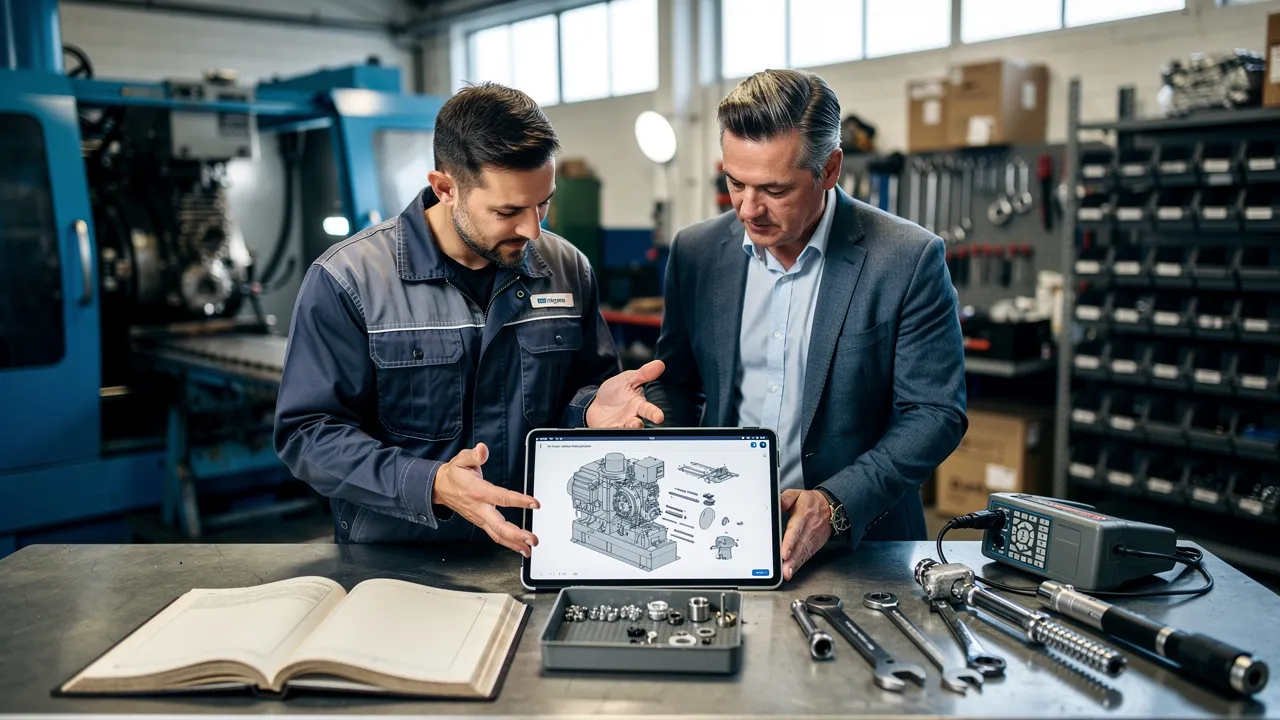
Start with the identification problem
The identification problem starts when a technician, dealer, operator, or customer knows what has failed but does not know which replacement part belongs to the equipment. A paper manual or static PDF can show a parts list, yet the person searching still has to connect a drawing, a callout, a part number, and the equipment configuration by hand.
An interactive parts manual connects those relationships digitally. An interactive parts catalog links parts lists to diagrams, bills of materials, exploded views, and part details so you can search for and identify parts digitally. Interactive Parts Catalogs create links between visual parts and their associated parts lists, extending the functionality of static parts manuals.
That distinction gives you a practical starting question: where does parts identification break down today? Look at the moments when your team has to interpret an illustration, confirm whether a part has been superseded, check a configuration, answer a fitment question, or re-enter an order into another system. If those moments are scattered across PDFs, spreadsheets, phone calls, and business applications, a connected workflow may be worth evaluating.
The relevant test is not whether a digital page looks newer than a printed book. The test is whether the equipment identity, part relationships, supporting documentation, and commercial information remain connected as you move from a question to a verified selection.
See what makes the manual interactive
An interactive parts manual makes the visual relationship between equipment and components usable rather than leaving you with a static page to interpret. The experience may include 2D diagrams, 3D models, exploded views, searchable part records, supporting documents, and links from a visual callout to the associated bill of material.
An interactive 3D spare-parts catalog can let you rotate, pan, and zoom an exploded assembly view to see the physical relationship between parts. A dealer, technician, or buyer can click a component in a 3D product assembly to see its part number, description, and ordering options.
A digital catalog can connect a part number to its visual callout, place that callout within a BOM sequence, and filter an assembly based on product applicability. That structure matters when several components look similar or when a larger assembly contains multiple sub-assemblies. The user can move from the equipment view to the relevant assembly, then from the visual location to the part record.
The term manual can describe a broader experience than a parts catalog. An interactive parts manual can provide detailed instructions, exploded views, 3D models, and other interactive elements for understanding assembly, maintenance, and repair procedures. Those materials can support understanding, but they do not replace official service procedures or authorize a repair.
When you assess a proposed experience, ask whether each feature helps answer a real identification question. Useful questions include:
- Can you move from a product or assembly to the relevant BOM?
- Can you select a visual callout and see the associated part details?
- Can you distinguish similar components without relying on memory?
- Can you open the supporting document that applies to the selected equipment?
- Can the selected part move into the next approved ordering step?
A polished viewer without reliable relationships between those records is still a difficult identification process.

Begin with the equipment, not just the part number
Equipment identity determines which parts information deserves your attention. A generic part search can expose several similar records, while a serial number, VIN, model, or other unique identifier can narrow the search to the relevant equipment configuration.
Digital parts catalogs can use VIN- or serial-number-specific lookup, visual part confirmation, and real-time cross-referencing to address fitment before an order is placed. That approach is especially relevant for manufacturers with model revisions, optional equipment, regional configurations, or long-lived machines that have changed over time.
When the part number is unknown, the available equipment context can still guide the initial search.
The workflow should make the equipment context visible before selection. Consider the following sequence:
- Identify the equipment using the identifier available to the user.
- Narrow the result to the applicable BOM or configuration.
- Open the relevant assembly or sub-assembly.
- Confirm the visual location and part details.
- Check the applicable availability, documentation, and ordering information.
This sequence does not certify that a part fits every machine. It gives your team a clearer basis for checking fitment before a selection moves further into support, warranty, or purchasing work.

Trace the part through support and ordering
The support-and-ordering path shows whether parts identification is connected to the work that follows. A self-service parts ordering system can connect technical identification and purchasing into a single continuous workflow. An interactive parts catalog can also integrate with ERP, PLM, and eCommerce or webshop systems to exchange master data, pricing, availability, and order information in both directions.
That connection can change the handoff between your customer and service team. A person may begin by identifying a component visually, then pass the selected part into an order or support request. Your team may still need to answer questions, but the conversation can begin with an equipment context and a selected record rather than an uncertain description.
Parts returns can result when orders rely on outdated catalogs, paper manuals, or generic part lists that do not confirm fit against the exact vehicle or machine configuration. Unreliable fitment data can contribute to wrong orders, return freight, warranty claims against the wrong part number, delayed service jobs, and lost sales when a customer receives no result. These are possible consequences, not guaranteed outcomes for every manufacturer.
A wrong-fit return concerns compatibility, while another return may concern damage, a defect, or a changed requirement; that distinction determines the investigation. If the catalog presented an incompatible part as suitable, examine the fitment record. If the warehouse shipped a different item, investigate fulfillment instead.
Auto parts carry a retail return rate close to 19.4 percent. That figure describes the auto-parts retail context and should not be used as a return-rate assumption for your equipment business.
Map the complete path before you judge the interface:
- identification by a customer, dealer, or technician;
- fitment and configuration review;
- availability, price, and order creation;
- service or warranty questions;
- fulfillment, return classification, and record correction.
The useful question is where information is preserved and where it is re-entered.

Treat catalog data as the control point
Catalog data controls the quality of the identification experience. Parts catalogs are often fragmented across spreadsheets, PDFs, and outdated software, while pricing, availability, and configuration data may reside in separate systems. Equipment manufacturers need a governed source for parts content because separate engineering drawings, static PDF manuals, and eCommerce storefronts can drift out of sync.
A bill of material lists the parts used on equipment. Part records should include a consistent name, manufacturer and item number, price, lead time, and quantity needed. Those fields give your teams a common basis for searching, reviewing, ordering, and maintaining the catalog.
A static PDF may contain a superseded part, so your service team may need to confirm availability, verify the replacement, and re-enter the transaction into the business system. If a supersession chain breaks, a search for a discontinued part number may return no result instead of redirecting to the current replacement.
Fitment errors can enter through missing application qualifiers, reversed supersessions, lost supplier records, or equipment context dropped from saved lists, quick order, or cart. The screen can look modern while the underlying relationship remains incomplete.
Use a data review that asks:
- Which team owns each BOM and part record?
- Which fields are required before a part becomes searchable?
- How are superseded records connected to current replacements?
- How are model revisions, options, and configurations represented?
- Where do price, lead time, availability, and quantity come from?
- How are corrections approved and republished?
Improve BOM accuracy by assigning a data owner who can update BOMs through a formal review process. Minor equipment-design changes and large capital projects can affect BOM accuracy, so procedures should correct BOMs when errors are found or equipment changes are made.
Treat the interface as the visible layer of a data-governance process. Without that process, new presentation can make uncertainty easier to navigate without making it smaller.
Plan how the catalog stays current
Catalog maintenance determines whether the information remains useful after launch. A catalog is only as good as the CAD and 3D data behind it, and messy source files can cause catalog projects to stall. Your evaluation should therefore include the condition, ownership, and update path of the source data before you focus on the front end.
A catalog generated directly from live CAD data can synchronize changes to CAD models, BOMs, or metadata automatically rather than requiring a manual update. Without an automated pipeline from CAD to a dealer portal, product updates require manual catalog edits and can lag by weeks. The practical question is not whether automation exists in principle; it is which records are connected, which changes trigger review, and who approves publication.
A vendor source published July 1, 2026, states that interactive parts catalog production can be cut by 6 to 8 times, from weeks to days or from days to hours. Treat that as a production-stage range, not as a typical duration for the full implementation. Data cleanup, integration, testing, approvals, training, and rollout are separate stages; after publication, ongoing maintenance covers updates to source records, BOMs, and configurations. To estimate the full implementation for your organization, ask for a scoped schedule that assigns timing and dependencies to each stage, using representative equipment records, BOMs, configurations, and integration questions rather than the production-stage range alone.
Build the maintenance plan around clear ownership:
- Engineering identifies the design or configuration change.
- The parts or product team checks the BOM relationship and part records.
- Service and warranty teams test the effect on common questions and claims.
- The catalog owner reviews the published result.
- The business-system owner checks price, availability, and order handoff.
Ask for a sample change during evaluation. Use a real revision, supersession, or configuration update and trace it from the source record to the published catalog. That exercise can show where manual work remains and where a stale record could survive unnoticed.

Evaluate the working environment, not only the screen
The working environment includes the devices, connectivity, people, systems, and controls surrounding the catalog. A web-based interactive parts catalog can be used on mobile devices, allowing technicians to identify and verify parts in the field without a desktop workstation or local software.
Interactive parts manuals are designed to be more user-friendly than traditional manuals, and visual aids, multimedia elements, and intuitive interfaces can make them accessible to a wider range of users. That does not mean every interface will suit every team. Evaluate the tasks your customers, dealers, technicians, warranty staff, and parts personnel actually perform.
Test the working environment with a short checklist:
- Devices: Evaluate whether the experience works across the desktops, tablets, and smartphones your teams and customers use.
- Search: Evaluate whether the search can quickly reach the required equipment, assembly, or part record.
- Visuals: Assess the quality of 3D models and interactive diagrams because poorly rendered visuals can hinder usability and lead to misinterpretations.
- Ordering: Evaluate integration with existing parts-ordering and inventory-management systems before adopting the catalog.
- Field access: If technicians work in remote locations, test offline access and confirm that offline packages generate correctly, show the right release version, and work without an internet connection.
- Security: If the manual contains sensitive equipment or operational information, use access controls and regularly update the software to address security vulnerabilities.
These tests should include a customer-facing path and an internal path. A customer may need a simple visual lookup, while a warranty team may need configuration context, supporting documents, and a traceable record of the selected part. A field technician may need a tablet workflow, while an administrator may need publishing and access controls.
A catalog can support a broader digital-transformation program, but that label does not answer whether the experience works for your equipment. Judge the working environment by the tasks it supports, the records it keeps aligned, and the boundaries it preserves.
Separate the implementation questions
Implementation planning separates the questions that are often collapsed into a single software discussion. Evaluate how the catalog is authored and updated, how parts are searched and visualized, and how it connects to ERP and eCommerce systems.
Legacy migration requires more than scanning pages. Extract the relationships among engineering drawings, BOMs, and product configurations, then rebuild them in a searchable platform. Before migration, gather physical parts manuals, PDF files, vector drawings, spreadsheet lists, and exports from the current ERP system. Identify product managers, engineering leads, and parts-department stakeholders who can authorize decisions when legacy records conflict.
Separate the work into questions you can answer:
- Source readiness: Which records are authoritative, and which files contain conflicting names, numbers, or configurations?
- Relationship reconstruction: How will drawings, callouts, BOM sequences, supersessions, and product applicability connect?
- Content production: Who creates or imports the visual and textual content, and who approves it?
- Business-system connection: How will the catalog exchange part records, pricing, availability, and order information with ERP, inventory, PLM, or eCommerce systems?
- User access: Which information belongs to customers, dealers, technicians, warranty teams, or administrators?
- Testing and release: Which sample products and change scenarios must pass before publication?
- Maintenance: Who owns corrections, updates, version control, and publication after launch?
Most enterprise electronic parts catalog vendors quote custom pricing on request, with an annual license scaled to catalog volume, users, and integrations. Treat price as one part of the operating model rather than a substitute for understanding the work required.
Use a stage-based timeline: data preparation, catalog production, integration, testing, approval, training, and rollout are implementation stages. Ongoing updates begin after publication as a maintenance phase. Compare any production estimate with that full sequence; that production range does not set the duration of the entire program.
Measure the workflow before promising results
Workflow measurement gives your organization a fair baseline before it changes the parts-identification process. Record how the current process behaves for a defined product line, equipment family, dealer group, or service channel instead of assuming that a new interface will produce a particular result.
Start with measures that describe the work:
- the number and type of unresolved parts questions;
- the time and handoffs required to identify a part;
- the reasons recorded for returns and warranty questions;
- the frequency of supersession or configuration questions;
- the number of orders requiring manual confirmation;
- the amount of re-entry between the catalog, ERP, inventory, and ordering systems;
- the share of users who reach a part record without assistance.
Define each measure before you collect it. For example, keep a wrong-fit return separate from a damaged shipment, a defective part, a changed requirement, or a warehouse picking error. That distinction tells you which part of the workflow needs attention.
Use the same definitions after a pilot or rollout. Compare the same equipment families, channels, and review periods where possible. A result can be useful without being dramatic: fewer unresolved records, clearer reasons for returns, or less manual re-entry may show where the process changed. Avoid calling any outcome a reduction unless your own before-and-after measurement supports that conclusion.
A baseline also improves a vendor conversation. You can ask how a proposed workflow handles the specific identification failures your teams already see, then decide which data, integration, or user-experience change is meant to address each one.
Keep safety decisions outside the catalog
Equipment safety remains a separate decision from parts identification. An interactive parts manual can help you locate a component or open associated documentation, but a catalog selection does not authorize equipment operation, maintenance, or repair.
The operation and service manual for an aerial platform revised January 14, 2026, gives this type of pre-operation direction for that equipment.
Keep the safety boundary visible in the workflow:
- Use the catalog to support identification and documentation access.
- Use the applicable manufacturer procedure for operation, inspection, maintenance, and repair.
- Do not treat a visual match as proof that a part is authorized for a specific safety-critical application.
- Do not operate equipment when its condition, configuration, or required procedure is uncertain.
A digital interface can make information easier to find. It does not replace responsible technical judgment, safety requirements, warranty terms, or instructions from the applicable authority.
Know when to seek professional evaluation
Professional evaluation is the right boundary when a parts or equipment decision could create physical or operational harm. If you cannot confirm fitment, if the selected part appears inconsistent with the equipment configuration, or if an incorrect part could affect safe operation, stop before ordering, installing, or operating the equipment.
Route the question to a qualified technician, the equipment manufacturer, or the responsible authority when any of these conditions applies:
- the equipment identifier is missing, unreadable, or inconsistent;
- the catalog shows more than one plausible part;
- a supersession or configuration change cannot be confirmed;
- the equipment may be damaged, unsafe, or not in good working order;
- the applicable service, inspection, or safety procedure cannot be located;
- a warranty or return decision depends on a technical determination.
The applicable manufacturer and safety instructions remain the governing reference for operation and service. Inspect equipment and confirm that it is safe and in good working order before operation.
An identification workflow is useful when it clarifies the question. It is not permission to guess when the answer remains uncertain.
Use BOM change control as the practical test
An interactive parts manual should be assessed through the changes it must carry, not only through its starting screen. Begin with one representative equipment BOM and assign a data owner for formal review. Trace one change from the engineering drawing or BOM through applicability data, the catalog record, pricing or availability, and the order path. This exposes the handoffs that can fail when a part is superseded, a configuration changes, or a correction is made.
Use the same change case to test the published result. Check whether configuration context remains attached to the applicable assembly and whether updates to CAD models, BOMs, or metadata can reach the catalog without a manual rebuild.
Set baseline measures for unresolved parts questions, identification failures, warranty or return reasons, and handoff effort before the change-control process is introduced. Compare those measures after updates are published rather than assuming a new interface will produce a particular result. Review exceptions with service, warranty, engineering, and parts teams; the catalog still depends on accurate CAD and 3D data and procedures that correct BOMs when errors or equipment changes occur.
Our Equip360 interactive 2D/3D BOM catalogs provide access to manuals, videos, and other associated documentation. Equip360 integrates with parts catalogs and ERP data. We can develop custom connectors for platforms not listed in our integrations. Equip360 is designed for complex equipment with deep BOM structures, multiple configurations, and long equipment lifecycles.
Where an incorrect part or equipment condition could create harm, follow the applicable manufacturer and safety instructions and contact a qualified professional or the responsible authority promptly.
Sources
- Electronic Parts Catalog Software: 2026 Guide | VNTANA - vntana.com, 2026-07-01
- Self Service Parts Ordering System Guide - Systems Online - sysonline.com
- Parts Returns in Dealer Networks: How Digital Catalogs Reduce Return Rates - linkedin.com, 2026-08-06
- Bill of Materials: Parts to Streamline Maintenance Work | MW - maintenanceworld.com
- Maximize ROI With An Interactive 3D Spare Parts Catalog - Systems Online - sysonline.com
- Parts Catalog Management: Fixing Data to Cut Wrong Orders | MDMS - moderndms.com.au
- Wrong-Fit Returns in Auto Parts: Causes and Fixes - virtocommerce.com, 2026-09-28
- Spare Parts | Interactive Parts Identification - threedy.io
- Why Are My Dealers Ordering the Wrong Parts and How to Fix It - volanosoftware.com
- OPERATIONS & SERVICE MANUAL - e-one.com
- 3D Parts Catalog Software for OEM Manufacturers | VNTANA - vntana.com
- Interactive Parts Manual Revolutionizing Maintenance - jobs.esade.edu
- What is an Interactive Parts Catalog? - Metanoia - metanoiacorp.com
- How to Migrate Legacy Data to a Digital Parts Catalog - Systems Online - sysonline.com
- The Power of Interactive Parts Catalogs: Elevating Your Company’s Efficiency and Customer Experience - ONEIL - oneil.com
- Interactive Parts Manuals for Manufacturers | GenAlpha - genalpha.com