
What OEM parts mean for equipment manufacturers
OEM parts are parts made by the original equipment manufacturer for use in its equipment or in another company’s finished product. Aftermarket parts are third-party replacement alternatives. For an equipment manufacturer, the distinction describes the part’s source; it does not, by itself, settle whether a particular replacement is the right choice for every machine, maintenance program, or buyer.
That distinction matters because your customers and dealers are not choosing a label in isolation. They are trying to identify a component, determine whether it applies to a particular machine, understand the available documentation, and complete a purchase through a workable path. An OEM part may be the manufacturer’s own replacement offering, while an aftermarket part may be a third-party alternative that fits a different maintenance or budget context. The information surrounding each option affects how confidently someone can compare and select it.
OEM-versus-aftermarket decisions are context-dependent parts-information and purchasing decisions. OEM parts are designed around the equipment manufacturer’s specifications, but that fact alone does not establish universal superiority over aftermarket alternatives. Those are useful comparison points, not blanket outcomes.
Your practical question is therefore broader than “Which part is better?” Ask whether the source, fit, documentation, identification signals, availability, and purchasing path are clear enough for the situation you need to support. A digital parts experience should make those questions easier to answer without turning an uncertain fit into a confident-looking selection.
An equipment manufacturer can make the comparison easier by connecting three layers: equipment identity, parts information, and purchasing action. A digital catalog can give technicians, dealers, and customers a way to identify and order parts from linked diagrams and parts lists. Interactive catalog software may also connect searchable product information with supported ordering workflows and with ERP, dealer-management, inventory, or order-management systems.
That connection gives you a practical standard for evaluating your own aftermarket support. Can someone begin with the equipment they have, move to a distinguishable part, understand the part’s applicability, and reach a purchasing path without losing the context? If the answer is unclear, improving the information path may matter before adding more products or more promotional language.
Overview
OEM parts come from the original equipment manufacturer, while aftermarket parts come from third-party replacement suppliers. Equipment manufacturers should compare those options across source, equipment fit, documentation, identification, availability, and the buying path rather than treating the OEM label as a universal quality verdict.
The comparison starts with the part itself, but it should end with the information experience around that part. A part number without applicability data may leave the buyer uncertain. A diagram without searchable part information may force manual interpretation. A product page without a clear equipment context may make two similar components look interchangeable when they are not established as interchangeable. Accurate equipment details can support correct parts diagrams and first-time-right ordering.
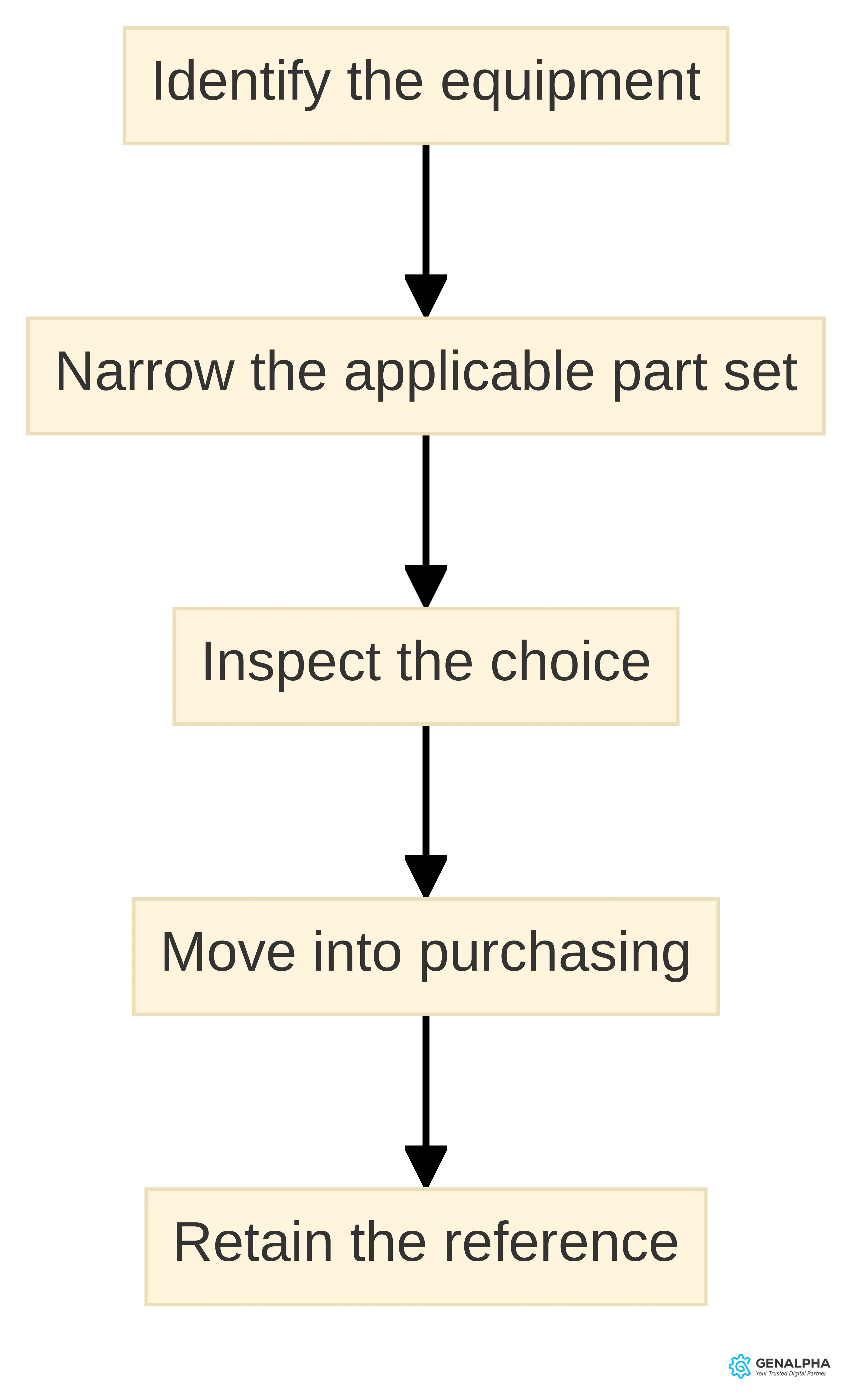
A useful parts path follows a simple sequence:
- Identify the equipment. Capture the model and the complete serial number where the manufacturer’s process supports that information.
- Narrow the applicable part set. Use the equipment details, diagrams, part numbers, and product applicability data together.
- Inspect the choice. Make source, part identity, replacement relationships, and relevant documentation visible.
- Move into purchasing. Connect the selected item to an available ordering path without dropping the equipment context.
- Retain the reference. Give the buyer, dealer, or service team enough information to understand what was selected.
A cited lookup guide recommends recording the full serial number, checking official resources and documents, and treating equipment year as a clue rather than the final parts answer. Parts compatibility can vary between model years, including within the same equipment series. Those points make equipment identity a working input, not an optional detail.
The comparison in this guide is general planning guidance for equipment manufacturers. A specific replacement decision still depends on the applicable equipment information, part documentation, and the technical judgment required for the machine and repair situation.
Key Highlights
The main points for an equipment manufacturer are:
- OEM and aftermarket describe source. OEM parts come from the original equipment manufacturer. Aftermarket parts are third-party replacement alternatives.
- Source does not settle every choice. OEM parts are designed around the manufacturer’s specifications, while aftermarket parts may offer lower cost, more choice, or greater availability in some situations. Neither premise supports a universal winner.
- Fit depends on equipment information. Model, full serial number, part number, applicability, and replacement relationships can matter when you narrow a parts choice. Compatibility can vary between model years, even within one equipment series. Presenting the available documentation clearly helps buyers compare what they are being asked to select.
- Illustrations can support identification. Interactive catalog software can link diagrams, parts lists, searchable product information, and supported ordering workflows. Clickable illustrations can help dealers and technicians identify parts without relying solely on manual processes.
- Online commerce should preserve context. The purchase path should carry the equipment and selected-part information forward instead of making the buyer start the identification process again.
- Improvement can be staged. Begin with the equipment and parts situations that create the greatest identification friction, then connect the information to the ordering path and the systems that support it.
Use these points as a review lens. They help you decide what to clarify first without promising that one source category, one catalog format, or one purchasing model will fit every equipment program.
Why OEM does not automatically mean better
The OEM label identifies the source of a part; it does not prove that the part is universally better than every aftermarket alternative. OEM parts are designed around the manufacturer’s particular specifications and designs. That can make source and intended equipment context easier to describe, but the specification relationship alone does not answer every maintenance, availability, or budget question.
Aftermarket parts may offer lower cost, broader choice, or greater availability in some situations. An aftermarket manufacturer may also address a design issue identified in an existing OEM part, according to the cited source. Those possibilities do not establish that aftermarket parts are always preferable. They show why the comparison needs stated criteria and a defined equipment context.
A useful comparison asks six separate questions:
- Source: Who made or supplies the part?
- Equipment fit: What equipment, model, serial range, assembly, or application does the available information identify?
- Documentation: What manuals, diagrams, instructions, or supporting product information accompany the choice?
- Identification: Can you distinguish the part from nearby alternatives using a number, marking, diagram location, or other supported signal?
- Availability: Is the part accessible through the purchasing path and maintenance context you are evaluating?
- Buying path: Can the selected part move from identification into an order without losing the relevant equipment context?
These questions separate facts from assumptions. A source may provide strong documentation but have limited availability in a particular channel. A third-party option may be accessible and economical for a routine wear component while requiring more careful fit confirmation. A digital catalog may present a polished diagram but still depend on accurate mappings and applicability data.
The decision discipline is simple: define the situation before evaluating the label. Specify the equipment, component type, maintenance context, information available to the buyer, and purchasing route. Then compare the options against those conditions. That approach gives your dealers and customers a clearer basis for action and keeps product presentation from implying a compatibility or performance conclusion that the available information does not establish.
Compare source and equipment fit before choosing a part
Source and equipment fit answer different questions. Source identifies whether the part comes from the original equipment manufacturer or a third-party supplier. Equipment fit concerns the machine, assembly, model, serial range, and documented applicability associated with the part. A source label cannot replace fit information, and a familiar-looking part cannot establish fit on its own.
| Criterion | OEM parts | Aftermarket parts |
|---|---|---|
| Source | Made by the original equipment manufacturer for its equipment or another finished product. | Made by a third-party supplier as a replacement alternative. |
| Equipment fit | Designed around the manufacturer’s specifications, with fit still dependent on the applicable equipment information. | Fit must be assessed against the available equipment and product information for the particular use. |
| Documentation can vary by supplier and part; compare what is provided for the choice under review. | ||
| Availability | Access depends on the manufacturer’s and channel’s purchasing path. | The cited sources identify greater availability as a possible advantage in some situations, not a universal result. |
| Choice and cost | Compare the specific OEM part's price and available alternatives through the relevant purchasing path. | Lower cost or broader choice may be available in some situations, but those benefits are not universal. |
| Buying path | A manufacturer can connect its parts information to an ordering workflow when the supporting data and systems are prepared. | A third-party choice still needs a clear identification and purchasing path for the equipment context. |
Equipment fit should be tested with the strongest identifying information available for the product line. For the Bobcat equipment covered by its official catalog, serial number, model number, or product type can be used for search, with serial-number lookup identified as the most accurate option.
For your own equipment line, map the equivalent identifying inputs and make their role explicit. If a model is only a starting point, say so. If a serial range controls applicability, expose that relationship where the buyer makes the selection. Do not present a generic model match as a final fit determination when the product data requires more detail.
Compare documentation and identification signals
A practical identification view can expose:
- the manufacturer or supplier designation;
- the complete part number and any documented replacement relationship;
- the equipment model and serial information used for the lookup;
- the diagram, assembly, or callout where the component appears;
- the quantity and component relationship recorded in the bill of materials;
- product applicability and any supported equipment boundary;
- the documentation or manual associated with the selection; and
- the action that takes the identified item into the purchasing path.
An illustrated catalog can combine CAD illustrations with bill-of-materials data containing component identities, quantities, and assembly relationships.
Dealers, technicians, and customers use identification signals in different ways, but each group benefits when the same part context remains visible. Clickable illustrations can help dealers and technicians identify spare parts without relying solely on manual processes. For customers, the visible part context can remain available while they assess the purchasing action.
It also gives your teams a clearer place to investigate an uncertain selection before treating it as an orderable choice.
Make uncertainty visible rather than forcing every lookup into a yes-or-no result. One workable presentation separates three states:
- Supported by the available data: The equipment identity, part record, and applicability information align within the records being shown.
- Needs review: The lookup has produced a likely candidate, but a serial range, replacement relationship, document, or other required input still needs attention.
- Not established: The available information does not support presenting the item as applicable, so the experience should identify what is missing or direct the user to an appropriate review path.
For each state, show which equipment detail or parts-data relationship controls the next step. These labels describe the state of the information, not a technical suitability verdict. They help a manufacturer avoid presenting an incomplete match with the same confidence as a documented selection.
When aftermarket parts may fit the maintenance context
Aftermarket parts may fit situations involving older equipment fleets, routine wear components, budget-sensitive maintenance programs, and high-volume consumables, according to the cited forklift and lift-truck guide. Another source identifies lower cost, broader choice, and greater availability as possible aftermarket advantages in some situations. These are context-specific considerations, not promises about every aftermarket part or every equipment line.
The maintenance context should therefore appear alongside the part comparison. An older fleet may have different availability and budget considerations from a recently introduced machine. A frequently replaced consumable may invite a different sourcing discussion from a component whose identification depends on a particular assembly or serial range. A manufacturer should present those distinctions without implying that the category alone determines suitability.
Use a focused check before presenting an aftermarket option:
- Name the maintenance situation. State whether the choice concerns an older fleet, a routine wear component, a budget-sensitive program, or a high-volume consumable.
- Separate source from fit. Identify the third-party source and show the equipment or application information used for the comparison.
- Compare documentation. Make the available manual, diagram, instructions, or product information visible rather than assuming equivalent documentation.
- Explain the identification method. Show the part number, markings, lookup inputs, or other supported signals that distinguish the option.
- Keep the purchase path clear. Connect the selected option to availability and ordering information without presenting those details as permanent or universal.
The action is to frame aftermarket parts as an option evaluated against defined conditions. Do not use the category label as a substitute for the fit and documentation review.
An equipment manufacturer can support a balanced choice by showing OEM and aftermarket options in separate, clearly labeled records when both are part of the supported experience. Keep source, applicability, documentation, and availability distinct. That presentation helps you avoid implying that a lower price proves equivalent performance or that an OEM source proves a universal advantage.
Use equipment identity to narrow the parts choice
A manufacturer can turn that principle into an equipment-data-to-purchase sequence:
- Capture: Ask for the model and complete serial number when those fields are available and relevant.
- Normalize: Preserve the full value instead of shortening it or silently changing its format.
- Match: Use the equipment identity to narrow the diagrams, assemblies, part numbers, and applicability records presented.
- Explain: Show why the selected record appears for that equipment context, including any model-year or serial-range boundary supported by your data.
- Confirm: Keep the equipment identity and selected part visible as the buyer moves toward purchase.
- Record: Retain the selection context in the order or service workflow where the connected system supports it.
The sequence is a design aid, not an instruction to make every product depend on a serial number. Use the identifying field that actually distinguishes parts in your product data, and expose its role plainly.
Test the path with representative requests from your equipment line. Include a common model, a model with meaningful year or serial variation, an assembly with several visually similar components, and a replacement relationship that requires explanation. Record where the request becomes ambiguous. That point identifies an information problem to solve before you add more purchasing options.
Build an illustrated parts lookup around reliable data
An illustrated parts lookup combines visual context with structured parts information. An illustrated parts catalog can combine CAD illustrations with bill-of-materials data such as component identities, quantities, and assembly relationships. The illustration is therefore not the complete experience. The bill of materials, part number, component mapping, applicability, and replacement relationship give the visual callout meaning. A diagram can show where a component sits; the structured data must support what the component is and whether it belongs in the equipment context being reviewed.
Reliable interactive catalogs depend on four data foundations:
- Accurate part numbers: The number displayed in the diagram, product record, and order path must refer to the same identifiable item.
- Component mappings: A callout must connect to the correct component record and assembly relationship.
- Product applicability: The record must identify the equipment or product context in which the part is presented.
- Replacement relationships: A superseded or replacement part must be connected in a way that preserves the selection logic.
Review these foundations before judging the front end. A more attractive illustration cannot resolve an incorrect mapping or missing applicability relationship.
An illustrated lookup should let you move through a coherent workflow:
- select or identify the equipment;
- open the relevant assembly or diagram;
- select a callout or search the parts list;
- inspect the part record and applicability;
- understand any replacement relationship;
- add the identified item to a supported ordering workflow.
Catalog software may also integrate with ERP, dealer-management, inventory, and order-management systems to coordinate parts identification and ordering. Evaluate each handoff separately. The catalog should not imply that an order, inventory result, or system update exists unless the connected workflow supports it.
We develop a data-scrubbing and conversion process to format parts data for Equip360. We upload data into the Equip BOM database and populate an interactive eCatalog with engineering call-outs. Those are our stated process capabilities; your product data, source files, and required equipment relationships still define the work that must be prepared for a particular implementation.
Before a catalog record is published, use a release check that follows the data through the lookup rather than reviewing the illustration alone. Confirm that the displayed part number matches the product record, that each callout points to the intended component, and that the equipment applicability is stated at the level the source data supports. Check that a replacement relationship explains what happens when the original record is no longer the selected item. Then walk through a representative lookup from equipment identity to the order transition and note any point where a user would have to infer a relationship.
Keep unresolved mappings or applicability questions visible in the preparation workflow. A catalog can only present the boundaries contained in its underlying records; it should not fill a gap with a confident-looking label. This check also gives the manufacturer a concrete list of data questions to resolve before evaluating presentation features or broader commerce connections.
Connect parts identification to online purchasing
A connected online path can be reviewed in five stages:
- Equipment entry: The buyer or dealer supplies the equipment information used for the lookup.
- Parts selection: The illustrated catalog and searchable records narrow the request to a distinguishable component.
- Product review: The page presents the part number, applicability, source, documentation, and replacement relationship supported by the data.
- Order transition: The selected item moves into the supported purchasing workflow with its identity intact.
- System handoff: Inventory, order, customer, shipment, or invoicing information moves through the connected systems when that integration is configured.
We can integrate directly with ERP or internal business systems to retrieve customer, item, sales-order, shipment, and invoicing details. That is a first-party capability statement about our work, not a general assumption about every catalog or implementation.
Test the online path with a real parts scenario rather than a generic storefront tour. Start with the equipment identity, select a component from an illustration, inspect the supporting information, add the item to the purchase path, and trace the information that should remain visible at each transition. Note the exact point where a buyer would need to leave the experience, re-enter data, or ask for manual assistance. That record gives you a concrete improvement brief.
What to improve in an OEM parts experience first
The first improvement should address the information gap that most often prevents a buyer or dealer from moving from equipment identity to a distinguishable part. The catalog should make the relevant equipment relationship visible for each part.
Do not begin with a broad promise about digital transformation. Begin with a traceable parts request and identify the missing or ambiguous information that blocks the next decision.
A practical improvement order is:
- Clarify equipment entry. Decide which model, serial, product type, or other identity fields the lookup needs.
- Repair the data relationship. Connect diagrams, bill-of-materials records, part numbers, applicability, and replacement relationships.
- Make identification visible. Expose callouts, searchable product information, source designation, and the part number together.
- Define the documentation handoff. Associate the available manuals or product information with the selection without implying that every option has identical documentation.
- Connect the order path. Carry the selected part and equipment context into the supported purchasing workflow.
- Trace system dependencies. Document the ERP, inventory, order, dealer-management, customer, shipment, or invoicing information required at each handoff.
- Test with actual scenarios. Use requests that include serial variation, similar components, replacement parts, and dealer or customer involvement.
This order keeps the visible buying experience tied to the data and system conditions underneath it. It also gives you a staged way to decide whether a larger digital parts initiative is justified.
To choose where to start, rank candidate improvements against four questions:
- Where does ambiguity stop the next decision? Identify the point at which a buyer, dealer, or service team can no longer distinguish the applicable part from nearby options.
- Which dependency controls that point? Determine whether the issue is an equipment field, a part number, a diagram-to-component mapping, an applicability rule, a replacement relationship, documentation, or a system handoff.
- Can the available data support the proposed change? If not, define the data preparation needed before promising a new lookup or ordering behavior.
- Can the scenario be tested from start to finish? Prefer a bounded request whose equipment context, selected part, documentation, and purchasing transition can all be inspected.
This lens prevents a manufacturer from treating every catalog concern as the same type of project. It also creates a decision record: the scenario selected, the information gap observed, the dependency behind it, and the next change to test. That record can support a focused platform discussion without assuming that a full replacement of existing systems is required.
The improvement target is a clearer path to an informed parts choice, not an automatic promise of fewer errors, lower downtime, or higher sales. Those outcomes require their own measurement and operating conditions. Define the information and handoff change first, then decide which business result you will evaluate.
When to evaluate a connected digital parts experience
A manufacturer may benefit from evaluating a connected digital parts experience when equipment identity, parts structure, and purchasing information are separated across manuals, internal systems, dealer workflows, and online records. The evaluation becomes more concrete when you can name the parts situations that create uncertainty and the system handoffs that should preserve the selected context.
We enable original-equipment and aftermarket product growth for OEMs. We offer a product called Equip360, and our Equip360 platform connects product data, parts structure, and commerce capabilities into one experience. Those statements describe our configured offering; they do not mean that every manufacturer has the same data readiness, integration requirements, or implementation boundary.
Consider a focused evaluation when several of these signals are present:
- customers or dealers rely on static PDFs or paper information to identify replacement parts;
- the same equipment and part details are re-entered between a catalog, storefront, and internal system;
- illustrations, bill-of-materials records, and product records are difficult to connect;
- replacement relationships or applicability boundaries are handled outside the main lookup path;
- the organization needs to support both original-equipment and aftermarket product activity;
- the purchasing path must draw on customer, item, sales-order, shipment, or invoicing details from an ERP or internal system; or
- teams need to test a parts scenario before committing to a broader digital program.
Electronic parts catalog software is described as a tool for linking parts lists to diagrams so technicians, dealers, and customers can identify and order parts. We can format parts data for Equip360, populate an interactive eCatalog with engineering call-outs, and integrate directly with ERP or internal business systems to retrieve the stated business details. Evaluate those capabilities against your own scenario rather than treating the list as a universal implementation plan.
A connected experience is not automatically the right next investment. If the equipment records, part numbers, mappings, or applicability rules are not ready, begin by defining and preparing that information. If the information is usable but the buying path breaks at a system handoff, focus the evaluation on that transition. The next step should match the specific gap you can demonstrate.
A focused evaluation brief should therefore include one representative equipment request, the identifying fields available to the user, the diagram or assembly involved, the part and applicability records, the documentation that should remain visible, and the systems involved in the purchasing transition. Ask the evaluation to show what information is carried from one stage to the next and where a human review remains necessary. Also separate what is already supported by the manufacturer’s records from what would require data conversion, configuration, or an integration decision. This keeps the conversation tied to a demonstrable parts scenario instead of a general promise about online commerce.
Prepare for a focused digital parts evaluation
OEM parts and aftermarket parts are source categories within a larger equipment-information and purchasing decision. Your evaluation should compare source, fit, documentation, identification, availability, and buying path for a defined maintenance or customer situation. Accurate equipment identity, illustrated lookup, structured parts data, and a connected order path give you the practical basis for that comparison.
Prepare one representative parts request before discussing a platform. Include the equipment model and serial information available to the buyer, the relevant diagram or assembly, the part number and applicability relationship, any OEM or aftermarket alternative you want to compare, the documentation that should accompany the choice, and the system handoffs required to place the order. That brief will make the conversation specific without assuming a universal outcome.
A qualified professional should determine individual technical suitability for a particular equipment or repair situation. For the digital experience, use the prepared scenario to examine how parts data is converted and how an interactive catalog presents engineering call-outs. We offer Equip360 for OEMs evaluating connected product data, parts structure, and commerce capabilities.
What should manufacturers verify before choosing an OEM or aftermarket part?
What are OEM parts and how do they differ from aftermarket parts?
OEM parts are made by the original equipment manufacturer for use in its equipment or in another company’s finished product, while aftermarket parts are third-party replacement alternatives.
How can I identify whether a part is OEM?
To determine if a part is OEM, check for the manufacturer's name, logo, or part number on the part or its packaging. Cross-reference this number with the equipment manual or a trusted supplier to confirm its authenticity.
What factors should I consider when comparing OEM and aftermarket parts?
When comparing OEM and aftermarket parts, consider the source, equipment fit, documentation, identification signals, availability, and the purchasing path. Each factor can influence the suitability of the part for your specific needs.
What steps should I follow to improve the online purchasing experience for OEM parts?
To enhance the online purchasing experience for OEM parts, clarify equipment entry, repair data relationships, make identification visible, define documentation handoffs, connect the order path, and test with actual scenarios.
When should an equipment manufacturer evaluate a connected digital parts experience?
An evaluation of a connected digital parts experience is beneficial when there are gaps in how equipment identity, parts structure, and purchasing information are managed across manuals, internal systems, and online records.
How can interactive parts catalogs enhance the parts identification process?
Interactive parts catalogs can improve the identification process by linking parts lists to diagrams, allowing users to easily identify and order parts without relying solely on manual processes.
Sources
- What Is an Original Equipment Manufacturer (OEM)? | Learning Center | MaintainX — www.getmaintainx.com
- OEM Vs Aftermarket Equipment Parts | Forklift & Lift Truck Replacement Guide — www.herculift.com
- Bobcat Serial Number Lookup – Check Model, Year & Parts Fit — www.amoparts.com
- Build Interactive IPCs from CAD and BOM Data — www.intellinetsystem.com
- New Holland Parts Lookup: How to Find the Right Part Fast — www.hragripower.com, 2026-04-13
- Bobcat Parts Catalog – Bobcat Company - Bobcat Company — www.bobcat.com
- What is OEM? - AutoZone — www.autozone.com
- Original Equipment Manufacturer (OEM): Definition and Examples — www.investopedia.com
- American Express — 4jtotalsupply.com, 2026-10-20
- Electronic Parts Catalog Software: Guide + Best Tools 2026 | VNTANA — www.vntana.com, 2026-07-01
- Machinery Manufacturers | GenAlpha
- Data Conversion
- FAQs | GenAlpha Technologies